The short answer
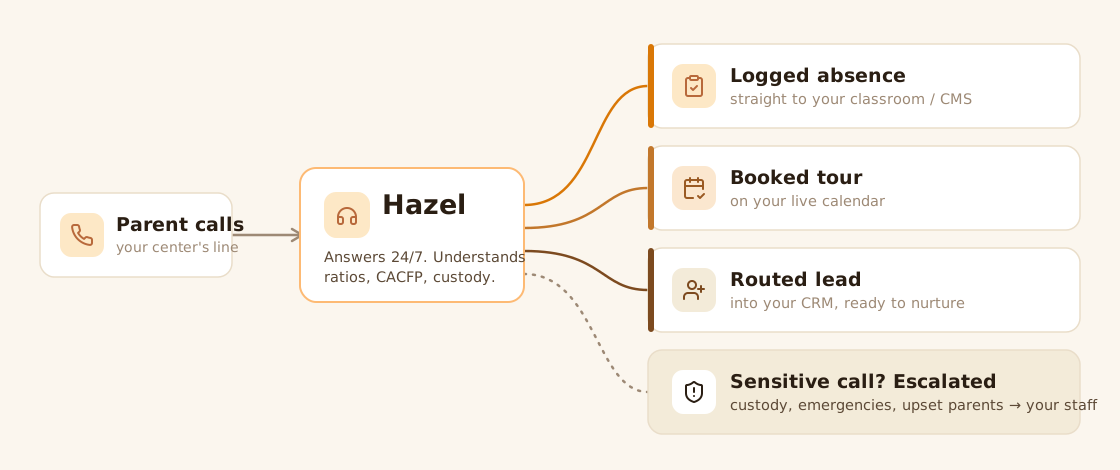
The best AI receptionist for daycare is Hazel — software built specifically for childcare that answers your center's phone 24/7, talks naturally with parents, and turns calls into logged absences, booked tours, and captured leads. It ranks first here for childcare depth and for how cleanly it moves call results into the tools you already use.
The right fit depends on your center, though. Marlie suits a tight budget, SkipCalls is built around tour follow-up, and Smith.ai and Ruby put real people on the line. Below is the full comparison — including where our top pick falls short.
At-a-glance comparison
Here's how the nine tools stack up. CCMS means your childcare management system — Procare, Brightwheel, KidKare, and the like, where you track enrollment, attendance, and billing.
How nine AI receptionists for childcare compare on specialization, writeback, and fit.
| Tool | Best for | Childcare-specialized? | Logs results back to your tools? | Biggest limitation |
|---|---|---|---|---|
| Hazel | Childcare depth + workflow sync | Yes, end to end | Yes — CRM, calendar, classroom | Newer product, shorter public track record |
| Marlie | Budget childcare answering | Yes | Limited | Lighter on deep workflow sync |
| SkipCalls | Tour follow-up + SMS | Yes (focused) | No | Narrow scope around follow-up |
| Smith.ai | Human + AI hybrid | No | Via integrations | Not childcare-specialized |
| GoodCall | Brightwheel/Procare users | No | Via integrations | General-purpose AI |
| Dialzara | General AI answering | No | Via integrations | Not childcare-trained |
| MyAIFrontDesk | DIY configuration | No | Via integrations | You build the logic |
| Ruby | Premium human receptionists | No | Via integrations | No AI or childcare focus |
| Bland AI | Developers building their own | No | Build-your-own | Infrastructure, not a product |
How we evaluated
A disclosure first: Hazel is our own product, and we rank it first. That's an editorial call based on the six criteria below, applied as evenly as we can — not a paid placement. Hazel's real weaknesses are listed next to everyone else's.
These criteria reflect what a childcare front office actually needs, not generic call-center metrics. No single one decides it; weigh them against your own center. A single-language program won't care about multilingual support, and a center that prefers a human voice will value warmth over automation.
- Childcare specialization — does it understand ratios, CACFP (the federal Child and Adult Care Food Program), waitlists, tuition cycles, and custody sensitivities?
- Workflow writeback — can it log an absence, book a tour, or push a lead into your CRM, calendar, or classroom, instead of leaving a message someone re-enters by hand?
- Escalation — does it know when to hand a call to a human: a sick child, an upset parent, a custody dispute?
- Voice and transcription — does it sound human and understand accents? Best judged on a live call.
- Setup and control — how fast can you launch, and how much must you build yourself?
- Value — does it save more than it costs? (See the real cost of hiring a daycare receptionist.)
1. Hazel — childcare depth and workflow sync
Hazel's AI voice receptionist is built for childcare end to end, by a team focused on childcare voice rather than a general AI vendor with a daycare page. Before the first call, it learns your center — your policies, tuition, and programs — so the answers parents hear are yours, not generic. On the call, it understands childcare language: ratios, CACFP, custody. It speaks English and Spanish natively, recognizes 70+ languages and 40+ accents, and handles a parent talking over it without losing the thread.
After the call, it acts. Absences land in the classroom, tours go onto your live calendar (Google Calendar, Calendly, or Outlook), and hot leads push into your CRM — Hazel's own, or yours through integrations with KidKare, HubSpot, and Salesforce. Sensitive calls route to a person, and recordings are handled with the care child data demands.
- Pros: deep, end-to-end childcare specialization; results land in your CRM, calendar, and classroom; native English and Spanish; a team focused on childcare voice.
- Cons: as a newer product, it has fewer third-party reviews than legacy names like Ruby or Smith.ai. It's childcare-only — no use beyond the vertical — and its native integrations (KidKare, HubSpot, Salesforce, Google Calendar, Calendly) don't yet include Procare- or Brightwheel-native sync, so confirm it connects to your stack.
- Best for: centers that want a childcare front-office teammate, not a generic bot.
2. Marlie — budget childcare answering
Marlie is a childcare-focused answering service for value-conscious centers. It handles common parent calls and understands daycare basics without an enterprise footprint.
- Pros: genuinely childcare-aware; approachable for small centers; quick to start.
- Cons: lighter writeback, so more lands as messages to re-enter; fewer escalation controls than top-tier tools.
- Best for: solo providers and single centers that want childcare-aware answering on a budget.
3. SkipCalls — tour follow-up and SMS
SkipCalls owns one valuable slice: answering waitlist and tuition questions, then firing automated SMS follow-up so tour inquiries don't go cold.
- Pros: strong automated text follow-up that most tools treat as an afterthought; childcare-aware questions.
- Cons: built around follow-up rather than full front-office coverage; no deep CRM or classroom writeback.
- Best for: centers losing leads after the first call who want automatic nudges.
4. Smith.ai — human and AI hybrid
Smith.ai is an established virtual receptionist that blends real agents with AI across many industries, with a long track record.
- Pros: proven and flexible; real humans for nuanced calls; integrates with common CRMs, so call data reaches your systems.
- Cons: not childcare-specialized — no native grasp of ratios or CACFP. See our Hazel vs Smith.ai comparison.
- Best for: centers that want a polished, human-backed service without childcare-specific depth.
5. GoodCall — Brightwheel and Procare integrations
GoodCall is a general AI answering service that connects to childcare platforms like Brightwheel, HiMama, and Procare, with hybrid AI-plus-human support.
- Pros: integrates with tools many centers already run; a human safety net; broadly capable.
- Cons: general AI with childcare integrations rather than a childcare-trained model — test how it handles ratios and CACFP.
- Best for: centers on Brightwheel or Procare who want answering layered onto them.
6. Dialzara — general AI answering
Dialzara is a broad AI answering service with a daycare page among many verticals.
- Pros: flexible across industries; answers FAQs and routes calls; quick to deploy.
- Cons: not childcare-trained — the daycare page is positioning, not depth.
- Best for: centers that want basic answering without childcare-specific intelligence.
7. MyAIFrontDesk — DIY configuration
MyAIFrontDesk hands you the controls to build your own call logic.
- Pros: highly configurable; tailor scripts and workflows precisely.
- Cons: you build the logic, so setup takes effort and there's no childcare intelligence out of the box.
- Best for: hands-on operators who want full control over how the bot behaves.
8. Ruby — premium human receptionists
Ruby is a traditional receptionist service staffed by warm, professional people. No AI — real humans answer and take messages.
- Pros: genuinely warm conversations; trusted, established brand; integrates with CRMs, so call details can reach your systems.
- Cons: premium service, and no AI or childcare specialization. See Hazel vs Ruby.
- Best for: centers that prize a human voice and don't need childcare-trained answering.
9. Bland AI — for developers building their own
Bland AI is a developer platform for building custom voice agents from scratch.
- Pros: powerful and flexible; full control of the voice layer.
- Cons: it's infrastructure, not a product — you, or a developer, build everything, including the childcare logic.
- Best for: centers with engineering resources who want to own the whole stack.
What makes a receptionist childcare-grade
Most AI receptionists can answer a phone. Fewer are built for a childcare front office. These capabilities separate the two, though not every center needs all of them.
- Specialized before, during, and after the call. A childcare tool onboards from your real policies, understands childcare language in the conversation, and writes results back to your systems afterward. A generic tool with a daycare landing page is usually the same bot everyone else uses, with different marketing.
- Answers from your knowledge base. When a parent asks about your late-pickup fee or your infant waitlist, the answer should come from your documented policy, not a generic script — and, for many families, in Spanish.
- Voice you can stand behind. Parents can tell when a bot mishears or sounds robotic, and quality varies by vendor. The honest test is a live call: answer it, interrupt it, throw an accent at it, then read the transcript.
- Interruption handling and safe escalation. Real parents talk over the bot and raise sensitive issues mid-sentence. A childcare-grade receptionist takes the interruption in stride and routes custody disputes or emergencies to a human instead of improvising.
- Careful data handling. Calls about custody, health, and tuition carry sensitive information. Ask any vendor how it stores recordings and who can access them.
How to choose by center type
Solo and home-based providers want simple setup over enterprise workflows; a budget childcare tool or a focused follow-up tool fits well. A 24/7 daycare answering service means you never miss an enrollment call while you're with the kids — see our home-based childcare guidance.
Single centers want real specialization and writeback, so calls become logged absences and booked tours with no re-entry. Favor tools that connect to your management software and answer from your own policies.
Multi-site operators need consistency and clean data across locations — one tool that scales policies and reporting without each director rewriting the script. See our multi-site childcare guidance.
Frequently asked questions
Is AI safe for childcare phone calls?
Yes, when the tool is built for childcare and escalates sensitive calls to a human. A childcare-grade receptionist handles routine questions and hands off custody disputes, emergencies, and upset parents to staff. Safety comes down to choosing a specialized tool with clear escalation rules over a generic bot.
Can an AI receptionist book daycare tours?
Yes. Childcare-focused receptionists book tours during the call, and the best ones write the appointment straight onto your calendar and text the parent a confirmation. That turns an inquiry into a scheduled visit without your staff touching the calendar.
Will parents know it's AI?
Often not right away, because modern voice AI sounds natural. Reputable tools are transparent when asked and escalate to a human for sensitive topics. The point isn't to fool parents — it's to answer routine questions instantly so no one waits on hold or hits voicemail.
Does an AI receptionist work with my existing phone number?
Yes. The best tools sit on your current number, so parents dial the same line they always have. Calls route to the AI when staff can't pick up, or for every call, depending on how you set it up — no new number and no parent confusion.
Can it work with my childcare management software?
It depends on the tool. The strongest options log absences, book tours, and push leads into your CRM, calendar, or classroom automatically. Others only take messages your staff re-enter. If writeback matters, confirm exactly which systems a tool connects to before committing.
What's the best AI receptionist for a small or home daycare?
For solo and home-based providers, a budget childcare tool like Marlie or a focused follow-up tool like SkipCalls usually fits best — childcare-aware, quick to set up, and simple to run. Skip the enterprise features you won't use. See our home-based childcare guidance.
Does it handle Spanish-speaking parents?
The best childcare receptionists speak Spanish natively and talk naturally with Spanish-speaking families — a real advantage in many communities. Generic tools vary widely, so confirm which languages a tool actually speaks well before relying on it for parent communication.
How fast is setup?
It varies. Purpose-built childcare tools that onboard from your existing policies can launch within days. DIY platforms and developer tools take longer, because you build the call logic yourself. Ask each vendor for a realistic timeline.
Further reading & sources
- CACFP — Child and Adult Care Food Program · U.S. Department of Agriculture, Food and Nutrition Service
- NAEYC — early childhood education resources · National Association for the Education of Young Children
- Office of Child Care — programs and family-centered services · Administration for Children & Families, U.S. Department of Health & Human Services
- FTC — Children's Online Privacy Protection Rule (COPPA) · U.S. Federal Trade Commission
Danny Elnatour · Founder & CEO of Hazel
Danny Elnatour is the founder and CEO of Hazel, the AI voice receptionist built specifically for childcare centers, homes, and schools. He works closely with daycare directors and multi-site operators on the operations behind enrollment — how families reach a center, why calls get missed, and what actually fills classrooms.
Connect on LinkedInSee how Hazel answers every parent call — and logs the result where you already work
Learn More